


AI Photo Editor: Art Studio
0.00.00 Reviews
App Specs
- Version
- 1.0.0
- Updated On
- License
- Free
- Downloads
- 100,000+
- Developer
- Leilani Rogers
- Categories
- Photography
- Platform
- Android
Screenshots


 Analysis by AppCompare
AI Photo Editor: Art Studio is aimed at people who want to reshape a picture without learning a full desktop editing suite. I’m most interested in how its mix of AI creation, object removal, background changes, and enhancement might fit into everyday photo tasks—and how approachable that work feels for people with different needs. Its appeal is clear: make a targeted change, keep the process on a phone, and avoid wrestling with a complicated stack of tools. The trade-off is that AI edits can be unpredictable, so a simple interface matters only if the results are also easy to inspect and correct.
Choosing an edit that matches the job
One practical question is whether a change should be made at all. For a personal social post, an imperfect AI reconstruction may be an acceptable creative shortcut. For a listing, an application photo, or an image used to explain something important, accuracy matters more. I’d keep edits modest whenever viewers need to trust that the photo still represents the scene or item faithfully.
It also helps to decide where the finished image will appear before editing. A small image viewed on a phone can hide a rough edge that becomes obvious when enlarged or printed. If I were preparing a picture for a larger format, I’d inspect it at a useful size and check the subject’s outline, shadows, and nearby texture before treating the result as done.
Making the editing path easier to follow
As a photography app from developer Leilani Rogers, AI Photo Editor: Art Studio puts several kinds of image editing under one roof. That can be useful for a newcomer who knows what they want—a cleaner product shot, a different setting, or a more polished portrait—but does not know which traditional editing tool to reach for. Rather than starting with layers, masks, and adjustment panels, the central idea is to describe or select a change and let AI do much of the work.
That convenience also makes clear navigation important. The tasks in this app are meaningfully different: removing an object is not the same job as changing a background, and generating AI art is not the same as improving a photograph. I would approach it one task at a time, choosing the tool that matches the specific problem instead of expecting one broad enhancement action to fix everything. That habit makes it easier to judge whether the result actually serves the image.
For someone comparing options, this sits between a basic one-tap filter editor and a more involved photo suite. A filter app is usually quicker when all you need is a preset look; a manual editor is more suitable when exact color, edge, or layer control matters. This app’s distinctive promise is the ability to attempt bigger edits with less hands-on technique. The practical question is whether the generated change looks convincing at the size and context where you plan to use it.
I would keep the original photo untouched and treat the edited version as a separate working copy whenever possible. That is especially sensible for object removal and background replacement, where AI may reconstruct details that were hidden or alter edges around hair, clothing, glass, or other intricate subjects. Reviewing the full image—not just the edited area—helps catch changes to lighting, texture, or composition that are easy to miss in a quick glance.
Worth Reading Before You Choose

Flipboard Shows What News Apps Must Do Beyond the Feed

Switching to Android Auto Means Rethinking Your Driving Routine

Google Calendar Makes a Crowded Week Easier to Manage

Ludo King Makes the Most of the Minutes Between Plans

Baby Panda World Brings Quick Play to Modern Phones, but Its Game Library Feels Busy

ESPN’s Live Game View Makes Following Close Games Easier
Readable results matter more than a clever prompt
AI editing can feel simple at first because it reduces the number of technical decisions. But ease of use also depends on whether the app makes it clear what action is being taken, what part of the image is affected, and how to judge the result. I would recommend short, specific requests rather than elaborate instructions. For example, describe the object to remove or the kind of background you want, then inspect the output before trying a different wording. This keeps cause and effect easier to understand.
A useful workflow is to make one change, pause, and compare the edited image with the original. If several adjustments are requested at once, it can be difficult to tell which instruction produced an unwanted result. This is not a special feature claim; it is a practical way to stay in control when using generative editing. It also helps people who find dense editing screens tiring, because each decision has a clear purpose.
Touch, visual comfort, and different ways of working
Phone-based editing can be convenient, but it asks the user to work on a relatively small display and interact through touch. People with limited dexterity may find precise selection around a small object or a complicated outline more demanding than making a broad adjustment. Anyone who experiences hand fatigue may prefer to edit a simpler, larger subject rather than attempt a detailed cutout in one sitting. I would avoid assuming that AI automatically removes this effort: the result still needs a careful visual check.
Visual sensitivity and low vision can affect the experience in different ways. A person may need larger text, stronger contrast, reduced screen brightness, or a quieter environment to work comfortably. The phone’s own display and accessibility settings may help, but they do not guarantee that every control or generated preview will be easy to perceive. Before relying on the app for an important image, I would test a low-stakes photo and check whether the editing steps and final result are comfortable to review.
AI-generated changes can also create sensory uncertainty. A background may look plausible at thumbnail size but reveal mismatched lighting or rough boundaries when enlarged. For a user who relies on visual detail, a final check on a larger screen or with a trusted person can be useful before sharing or printing. Conversely, someone who mainly posts small images may find minor imperfections less noticeable. The right standard depends on the intended use, not simply on whether the app produced an edit.
There is a helpful distinction between edits that are easy to evaluate and those that are not. Removing a bright object from a plain wall is usually simpler to judge than reconstructing a patterned surface or changing a busy scene. I would start with the straightforward case, learn what kinds of results look acceptable, and reserve complex images for a tool that offers more direct manual control if the AI output falls short.
When a quick edit fits the moment
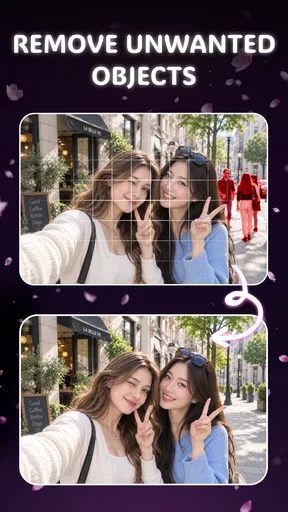
Imagine taking a photo of a handmade item at home, then noticing a distracting object in the background just before posting it for a local sale. An object-removal or background-editing workflow could help turn that snapshot into a cleaner presentation without requiring a computer. I would still check that the item’s outline has not been softened or altered; accuracy matters more than a spotless-looking backdrop when a buyer needs to see what is actually being sold.
Another sensible use is preparing a casual portrait for a profile or invitation. A restrained background change may make the subject stand out, while enhancement could help a photo that looks a little flat. The key is to avoid asking the app to transform the person along with the setting unless that is genuinely desired. Keeping edits focused makes the image feel more like a polished photograph and less like an artificial composite.
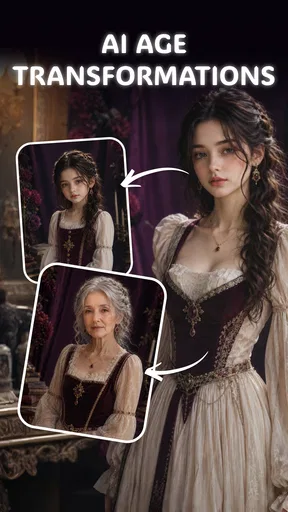
For creative play, AI art offers a different kind of value. It can be a low-pressure way to explore a visual idea or turn a personal image into something more imaginative. I would treat those outputs as creative interpretations, not faithful records of the original. If preserving exact details is important—for a family archive, a document, or a product listing—generative changes are a poor substitute for careful conventional editing.
Situational access also means thinking about where and when editing happens. A phone makes it possible to work during a short break, but a small screen, glare, notifications, or a rushed setting can make careful review harder. I would save the final decision for a calm moment if the image matters. A quick first pass on the go can be useful; a second look before sharing is a better safeguard against missed edges and unintended changes.
Where AI convenience can become a barrier
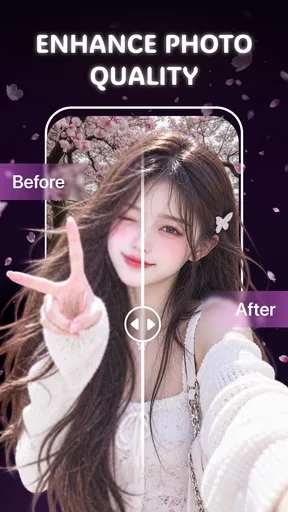
The largest limitation is the nature of AI itself: the app may interpret a request differently from the user’s intention. A removed object can leave an odd patch, and a changed background can produce an edge that does not quite match the subject. Enhancement can also make an image look less natural if the improvement is too strong. These are not reasons to avoid the app, but they are reasons to regard every generated result as a draft rather than a guaranteed finish.
There is also a control trade-off. Someone who wants to specify exactly how a mask follows a strand of hair, tune a particular color, or preserve every original pixel may be better served by a conventional editor with precise manual tools. A simple AI workflow is less intimidating, but that simplicity can limit how much fine correction the user can make. If the first result is close but not right, the amount of control available becomes especially important.
Another barrier is the gap between knowing what you want and knowing how to ask for it. A vague request can lead to a vague result, while a very detailed prompt may be cumbersome to compose on a phone. I find it more practical to name the subject, the change, and the desired restraint in plain language, then adjust only one part at a time. That approach is easier to learn and makes it less likely that a creative instruction will unintentionally change the whole image.
The app is free, carries an Everyone age rating, and has reached over 100,000 installs. It was released on September 9, 2026, and its current version is 1.0.0, with Android 7.0 as the minimum operating system. Those details make it straightforward to assess basic availability, but they do not answer whether its particular editing flow suits every user. I would try it with a nonessential image first, especially if accessibility needs make precise touch work or visual inspection difficult.
Who will get the most from it
I’d recommend this app to casual photographers who want to try substantial edits without studying a complex editor, and to people who enjoy experimenting with image transformations. It is particularly promising for quick, clearly defined tasks: cleaning up a simple background, removing an obvious distraction, or testing a creative treatment. Its value is less certain for professional retouching, accessibility-critical workflows, or images where exact factual detail must remain unchanged.
If you mainly want reliable brightness, cropping, and color adjustments, a conventional editor may be faster and more predictable. If you need painstaking selections or a repeatable workflow for many images, a more manual tool is likely a better fit. On the other hand, if you are curious about AI editing and willing to review its work, this offers an approachable place to experiment without paying for the app itself.
A sensible first test is to choose a photo with one obvious, uncomplicated problem rather than a cherished picture or a crowded scene. That gives you a low-stakes way to see whether the controls are understandable and whether the result is easy enough to assess. If the edit comes out oddly, try a narrower request instead of piling on more instructions; if the same kind of task remains frustrating, switching to manual editing is a reasonable choice, not a failure to use AI well.
For someone deciding whether the app fits their routine, the key question is not simply whether it can make dramatic changes. It is whether those changes save enough effort after review and correction. A quick cleanup that needs only a glance may be worthwhile, while an edit that demands repeated prompting and close inspection can take longer than a straightforward conventional adjustment. I’d judge it by the finished image and the time and attention the process asks of me.
My inclusive verdict is cautiously positive: AI Photo Editor: Art Studio brings ambitious photo changes within reach of people who may not want a technical editing toolkit, and that can make creative work feel less intimidating. It is not automatically effortless for every hand, eye, or situation, and its generated results still need human judgement. Start with a simple photo, make one change at a time, and keep the original. If that measured workflow feels comfortable and the output meets your needs, the app is a useful addition; if precision or low-effort access is essential, choose a tool that gives you more direct control.
Pros
- AI tools can turn ordinary photos into creative
- stylized images.
- Useful for quick edits without advanced photo-editing skills.
- A range of effects makes it easy to experiment with different looks.
- Can help give portraits and social posts a more polished appearance.
- A convenient choice for creating artwork directly on a mobile device.
Cons
- AI results may vary
- so some edits can look inconsistent.
- Fine control over individual editing details may be limited.
- Processing advanced effects may take time on older devices.
- Some tools or content may require payment or a subscription.
- Uploading photos for AI processing may raise privacy concerns.
FAQs for AI Photo Editor: Art Studio
What is AI Photo Editor: Art Studio?
AI Photo Editor: Art Studio is a photo-editing app designed to use artificial intelligence to help transform and enhance images. Depending on the tools available in your version, you may be able to apply artistic effects, adjust a photo’s appearance, or create stylized results from existing pictures. Check the app’s current store listing for an accurate overview of its features, since tools and availability can change with updates.
Is AI Photo Editor: Art Studio free to download and use?
The app may be free to download, but that does not necessarily mean every feature is free. Some photo effects, editing tools, or AI-generated results may require a subscription, an in-app purchase, or credits. Before using it extensively, review the pricing details in the relevant app store and check whether any trial renews automatically. The available plans and restrictions can vary by device, region, and app version.
Do I need an internet connection to use AI Photo Editor: Art Studio?
Basic editing and image browsing may work offline if the relevant tools are processed on your device, but AI features often need an internet connection to send a request to an online service. Without connectivity, generation or cloud-based effects may be unavailable or take longer to complete. If offline use matters to you, check the app’s current description and try its tools before relying on it away from Wi-Fi or mobile data.
What happens to photos I upload or edit in the app?
Photo-editing apps may process images on your device or upload them to online servers, particularly when an AI feature is involved. The exact handling depends on the app’s current privacy policy and settings. Before selecting personal or sensitive images, review the permissions requested, the privacy information in the app store, and any account or deletion options. Avoid assuming that an image is stored only locally unless the developer clearly confirms this.
Is AI Photo Editor: Art Studio suitable for beginners, and what device does it require?
An app focused on AI-assisted editing may be approachable for beginners because effects can often be applied with a few taps, though the available controls and results can still take experimentation. Compatibility depends on the device’s operating system and the app’s latest requirements, so check the store listing before downloading. Also consider storage space, camera or photo-library permissions, and whether your device has a reliable internet connection for online AI tools.


